
As part of a grant funded by the Alfred P. Sloan Foundation to analyze altmetrics and expand the Zotero API, our research partners at Indiana University are studying the readership of reference sources across a range of platforms. Cassidy Sugimoto and a team of researchers at IU have developed an anonymous, voluntary survey that seeks to analyze the bibliometrics of Zotero data. The survey includes questions regarding user behavior, discoverability, networking, the research process, open access, open source software, scholarly communication, and user privacy. It is a relatively short survey and your input is greatly appreciated. We will post a follow-up to the Zotero blog that analyzes the results of the survey. Follow this link to take the survey.
A Better “Save to Zotero” Button in Chrome
It’s now easier than ever to save webpages and PDFs from Google Chrome to Zotero.
(Note: If you use Firefox, you already have these features. If you use Safari, stay tuned — you’ll be getting the same features soon.)
Previously, when Zotero’s Chrome extension found high-quality data to save on a webpage, it would display an icon in the Chrome address bar. For webpages where it couldn’t detect any data, you could right-click on the page and choose “Save Page to Zotero” to add a basic webpage item and snapshot to Zotero.
In the latest version of the Chrome extension, it’s now possible to save any page to Zotero with a new, permanent button in the Chrome toolbar:
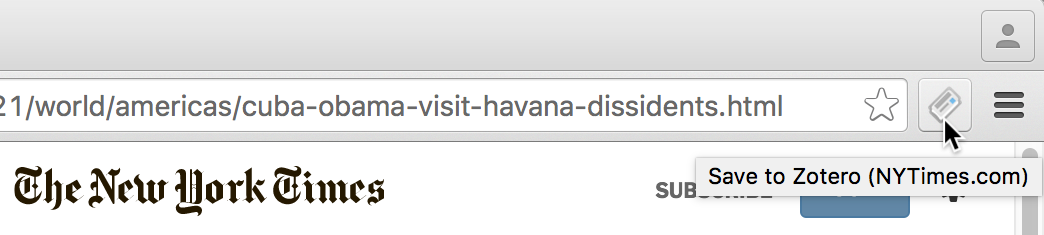
When high-quality data is available, the new button will show the same icon as before: newspaper, journal article, folder, etc. On all other pages, you’ll see a gray page icon, and clicking on it will create a basic webpage item and snapshot in Zotero. Hovering over the icon will tell you which translator, if any, Zotero would use to save the page.
In addition to combining the existing save functionality into a single button, the updated Chrome extension adds two new features previously available only in Firefox:
On some webpages, Zotero can save data using multiple translators, but up until now it hasn’t been possible to choose a secondary translator from Chrome. You can now right-click (ctrl-click on a Mac) on the new save button to see additional options for saving from the current page, including saving as a regular webpage instead of using a translator.
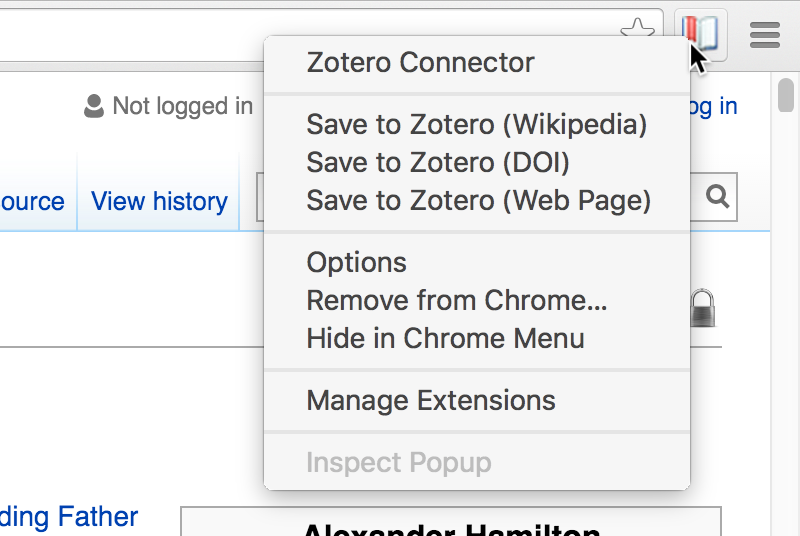
Secondary translators may provide different data for the page itself or data for other sources referenced in the page (for example by DOI, as in the Wikipedia example above).
If you’d prefer to hide the new icon, the same options are available by right-clicking on the page background.
You can also now save PDFs to Zotero with a single click:
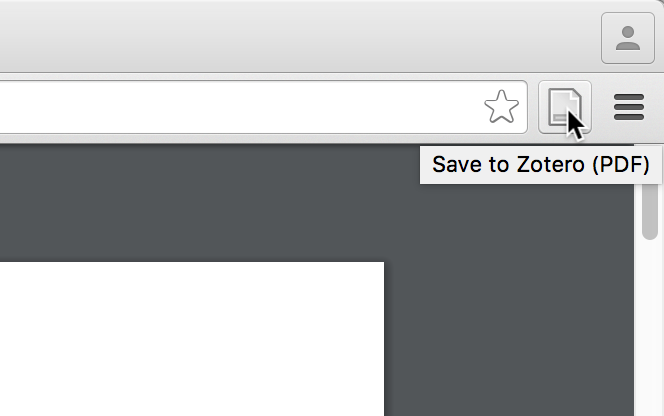
Previously, saving a PDF to Zotero from Chrome required dragging from the address bar into Zotero or saving the PDF to disk and adding it to Zotero manually. Now, when you’re viewing a PDF in Chrome, simply click the new toolbar button to save the PDF as a top-level attachment in Zotero. You can then right-click on the PDF in Zotero and choose either “Retrieve Metadata for PDF” or “Create Parent Item” to create a full bibliographic item. (In an upcoming version, Zotero will attempt to create a parent item for you automatically.) You’ll need Zotero Standalone 4.0.29 or later to save PDFs from the new save button.
Finally, note that, despite the new button, a couple previous limitations haven’t changed. When data is detected on a page, the appropriate icon won’t appear until the page has completely finished loading — before then, you’ll see the gray webpage icon. When data isn’t detected, saving a webpage item and snapshot requires Zotero Standalone to be open — Zotero will warn you if it’s not. Direct-to-server saving of webpage items will be added in an upcoming release.
If you have the latest version of Chrome installed, you should be updated to version 4.0.29.1 of the Zotero Connector automatically. If you’re not currently using Zotero with Chrome, you can install the extension from the Chrome Web Store. Either way, make sure you’ve installed Zotero Standalone for the best experience.
Studying the Altmetrics of Zotero Data
In April of last year, we announced a partnership with the University of Montreal and Indiana University, funded by a grant from the Alfred P. Sloan Foundation, to examine the readership of reference sources across a range of platforms and to expand the Zotero API to enable bibliometric research on Zotero data.
The first part of this grant involved aggregating anonymized data from Zotero libraries. The initial dataset was limited to items with DOIs, and it included library counts and the months that items were added. For items in public libraries, the data also included titles, creators, and years, as well as links to the public libraries containing the items. We have been analyzing this anonymized, aggregated data with our research partners in Montreal, and now are beginning the process of making that data freely and publicly available, beginning with Impactstory and Altmetric, who have offered to conduct preliminary analysis (we’ll discuss Impactstory’s experience in a future post).
In our correspondence with Altmetric over the years, they have repeatedly shown interest in Zotero data, and we reached out to them to see if they would partner with us in examining the data. The Altmetric team that analyzed the data consists of about twenty people with backgrounds in English literature and computer science, including former researchers and librarians. Altmetric is interested in any communication that involves the use or spread of research outputs, so in addition to analyzing the initial dataset, they’re eager to add the upcoming API to their workflow.
The Altmetric team parsed the aggregated data and checked it against the set of documents known to have been mentioned or saved elsewhere, such as on blogs and social media. Their analysis revealed that approximately 60% of the items in their database that had been mentioned in at least one other place, such as on social media or news sites, had at least one save in Zotero. The Altmetric team was pleased to find such high coverage, which points to the diversity of Zotero usage, though further research will be needed to determine the distribution of items across disciplines.
The next step forward for the Altmetric team involves applying the data to other projects and tools such as the Altmetric bookmarklet. The data will be useful in understanding the impact of scholarly communication, because conjectures about reference manager data can be confirmed or denied, and this information can be studied in order to gain a greater comprehension of what such data represents and the best ways to interpret it.
Based on this initial collaboration, Zotero developers are verifying and refining the aggregation process in preparation for the release of a public API and dataset of anonymized, aggregated data, which will allow bibliometric data to be highlighted across the Zotero ecosystem and enable other researchers to study the readership of Zotero data.
Zotero 4.0.27: Streamlined saving, easier bibliography language selection, and more
Zotero 4.0.27, now available, brings some major new features, as well as many other improvements and bug fixes.
Streamlined saving (Zotero for Firefox)
In Zotero for Firefox, it’s now easier than ever to save items from webpages.
Zotero senses information on webpages through bits of code called site translators, which work with most library catalogs, popular websites such as Amazon and the New York Times, and many gated databases.
In the past, there have been two different ways of saving web sources to Zotero:
- If Zotero detected a reference on a webpage, you could click an icon in the address bar — for example, a book icon on Amazon or a journal article icon on a publisher’s site — to save high-quality metadata for the reference to your Zotero library.
- If a site wasn’t supported or a site translator wasn’t working, you could still save any webpage to your Zotero library by clicking the “Create Web Page Item from Current Page” button in the Zotero for Firefox toolbar or by right-clicking on the page background and choosing “Save Page to Zotero”. In such cases, you might need to fill in some details that Zotero couldn’t automatically detect.
In Zotero 4.0.27, we’ve combined the address bar icon and the “Create Web Page Item from Current Page” button into a single save button in the Firefox toolbar, next to the existing Z button for opening the Zotero pane.
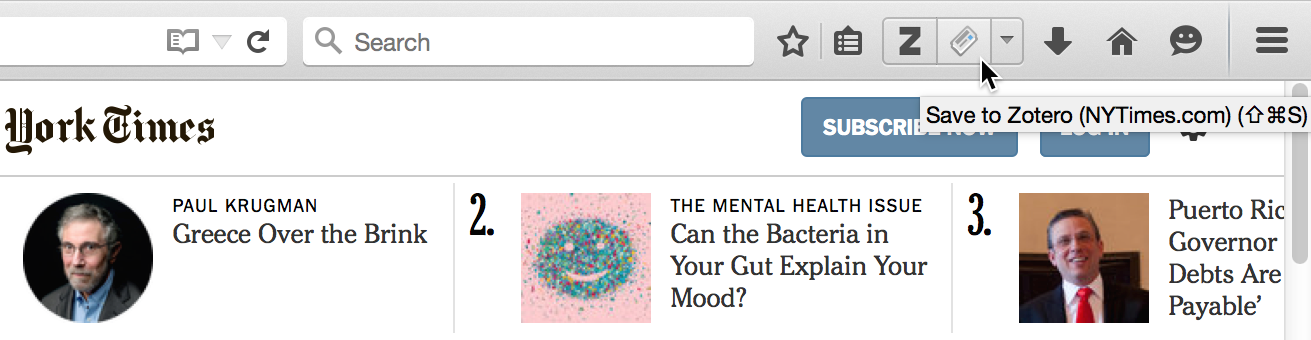
The new save button on a New York Times article
(Don’t be confused by the book icon in the address bar in the top left — that’s a new Firefox feature, unrelated to Zotero.)
You can click the new save button on any webpage to create an item in your Zotero library, and Zotero will automatically use the best available method for saving data. If a translator is available, you’ll get high-quality metadata; if not, you’ll get basic info such as title, access date, and URL, and you can edit the saved item to add additional information from the webpage. The icon will still update to show you what Zotero found on the page, and, as before, you can hover over it to see which translator, if any, will be used.
This also means that a single shortcut key — Cmd+Shift+S (Mac) or Ctrl+Shift+S (Windows/Linux) by default — can be used to save from any webpage.
The new save button also features a drop-down menu for accessing additional functionality, such as choosing a non-default translator or looking up a reference in your local (physical) library without even saving it to Zotero.
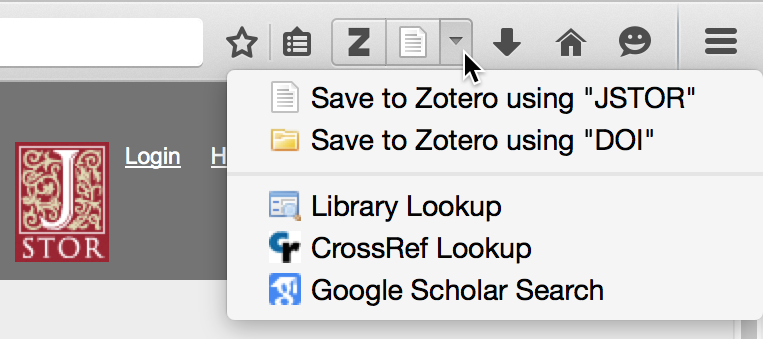
Additional save options
(This functionality was previously available by right-clicking on the address bar icon, though if you knew that, you surely qualify for some sort of prize.) The new menu will be used for more functionality in the future, so stay tuned.
Prefer another layout? In addition to the new combined toolbar buttons, Zotero provides separate buttons for opening Zotero and saving sources that can be added using Firefox’s Customize mode.

Custom button layout
With the separate buttons, you can hide one or the other button and rely on a keyboard shortcut, move the buttons into the larger Firefox menu panel, or even move the new save button between the address bar and search bar, close to its previous position. (Since the new save button works on every page, it no longer makes sense for it to be within the address bar itself, but by using the separate buttons you can essentially recreate the previous layout.)
While all the above changes apply only to Zotero for Firefox for now, similar changes will come to the Chrome and Safari connectors for Zotero Standalone users in a future version. For now, Zotero Standalone users can continue to use the address bar (Chrome) or toolbar (Safari) icon to save recognized webpages and right-click (control-click on Macs) on the page background and choose “Save Page to Zotero” to save basic info for any other page.
Easier bibliography language selection
Making Zotero accessible to users around the world has always been a priority. Thanks to a global community of volunteers in the Zotero and Citation Style Language (CSL) projects, you can use the Zotero interface and also generate citations in dozens of different languages.
Now, thanks to community developers Rintze Zelle and Aurimas Vinckevicius, it’s much easier to switch between different languages when generating citations.
Previously, Zotero would automatically use the language of the Zotero user interface — generally the language of either Firefox or the operating system — when generating citations. While you’ve always been able to generate citations using a different language, doing so required changing a hidden preference.
You can now set the bibliography language at the same time you choose a citation style, whether you’re using Quick Copy, Create Bibliography from Selected Items, or the word processor plugins.
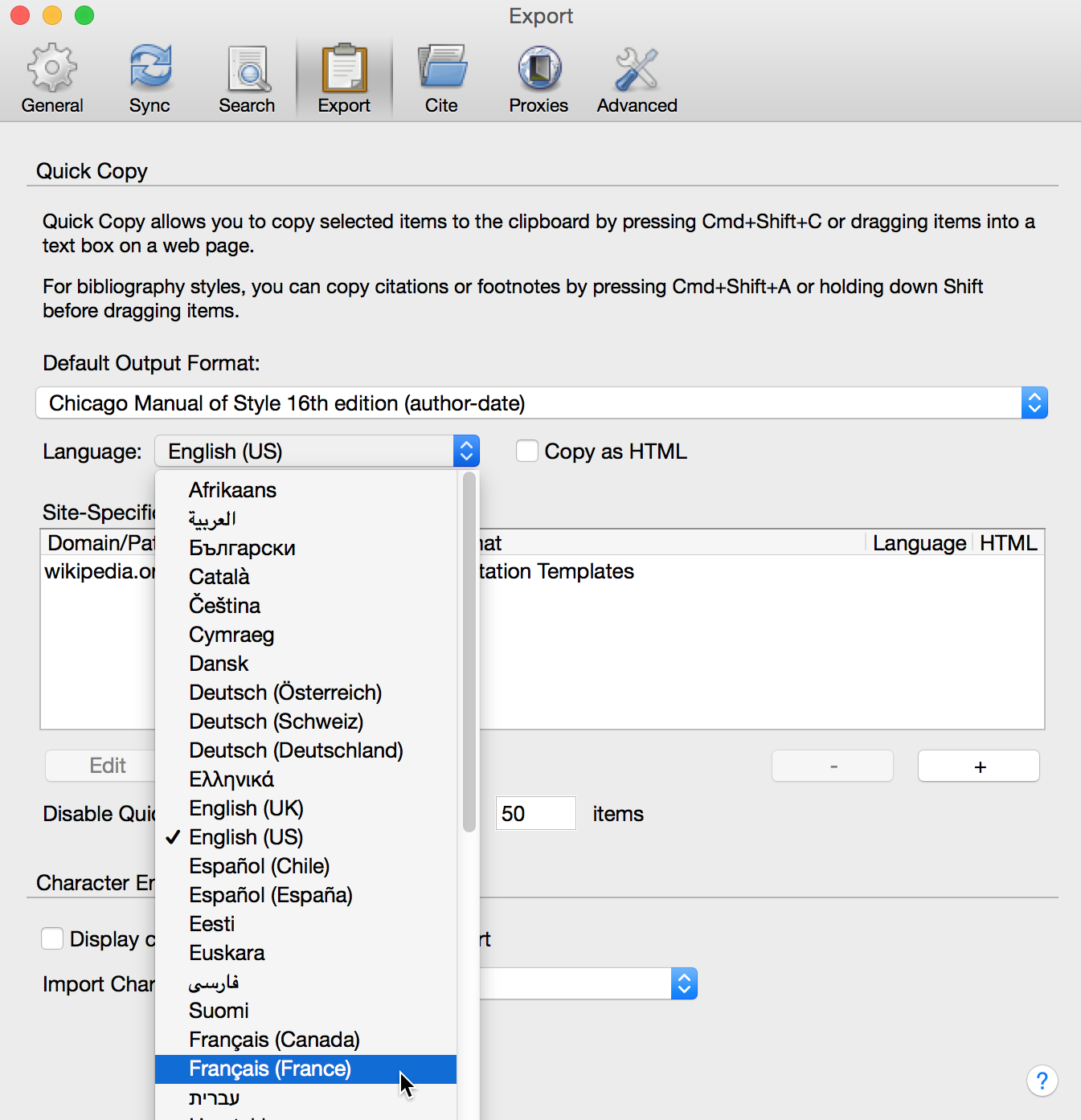
Choosing a bibliography language for Quick Copy
In the above example, even though the user interface is in English, the default Quick Copy language is being set to French. If an item is then dragged from Zotero into a text field, the resulting citation will be in French, using French terms instead of English ones (e.g., “édité par” instead of “edited by”).
The new language selector is even more powerful when using the word processor plugins. The bibliography language chosen for a document is stored in the document preferences, allowing you to use different languages in different documents — say, U.S. English for a document you’re submitting to an American journal and Japanese for a paper for a conference in Japan.
Note that, of the thousands of CSL styles that Zotero supports, not all can be localized. If a journal or style guide calls for a specific language, the language drop-down will be disabled and citations will always be generated using the required language. For example, selecting the Nature style will cause Zotero to use the “English (UK)” locale in all cases, as is required by Nature’s style guide.
Other changes
Zotero now offers an “Export Library…” option for group libraries, allowing the full collection hierarchy to be easily exported. If you find yourself facing many sync conflicts, you can now choose to resolve all conflicts with changes from one side or the other. For Zotero Standalone users, we’ve improved support for saving attachments from Chrome and Safari on many sites, bringing site compatibility closer to that of Zotero for Firefox. And we’ve resolved various issues that were preventing complete syncs for some people.
There’s too much else to discuss here, but see the changelog for the full list of changes.
Get it now
If you’re already using Zotero, your copy of Zotero should update to the new version automatically, or you can update manually from the Firefox Add-ons pane or by selecting the “Check for Updates” menu option in Zotero Standalone. If you’re not yet using Zotero, try it out today.