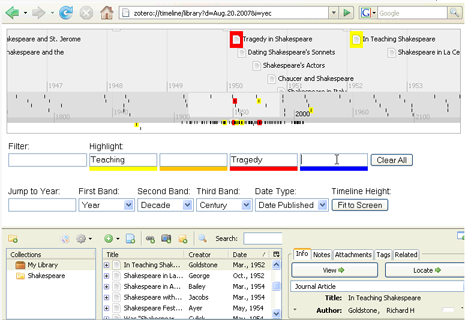
The latest version of Zotero, 1.0.0rc3, integrates MIT’s SIMILE Timeline widget, allowing you to generate timelines in a single click from any collection or saved search. Watch this screencast to see how it works.

The latest version of Zotero, 1.0.0rc3, integrates MIT’s SIMILE Timeline widget, allowing you to generate timelines in a single click from any collection or saved search. Watch this screencast to see how it works.
We are excited to announce the launch of Zotero 1.0 Release Candidate 2. This release adds many new features.
Zotero now offers full-text indexing of PDFs, adding your archived PDFs to the searchable text in your collection.
Zotero’s integration with word processing tools has been greatly improved. The MS Word plugin works much more seamlessly and we now support OpenOffice on Windows, Mac (in the form of NeoOffice), and Linux.
Zotero is also now better integrated with the desktop. Users can drag files from their desktop into their Zotero collection and can also drag attachments out of their Zotero collection onto their desktop.
We have begun to add tools to browse and visualize Zotero collections in new ways. Using MIT’s SIMILE Timeline widget, Zotero can now generate timelines from any collection or selected items.
The new version of CSL (Citation Style Language), used by Zotero to format references into specific styles, is more human readable and easier to edit. We will be adding many more styles soon.
Users should also notice some performance enhancements. Zotero now runs smoother on Windows and Linux.
Stay tuned for more detailed information on these developments. We will post more documentation and screencasts about these features in the next few weeks. We have also added support for a host of additional web resources:
Research Databases
ARTFL Encyclopédie
OpticsInfoBase
Institute of Physics
RSC Publishing
News
The Economist
Time
The Age
The Australian
New Zealand Herald
Sydney Morning Herald
stuff.co.nz
Genealogy
Ancestry.com
Cooking
Epicurious.com
For a more exhaustive look at Zotero’s new features and bug fixes see the full changelog.
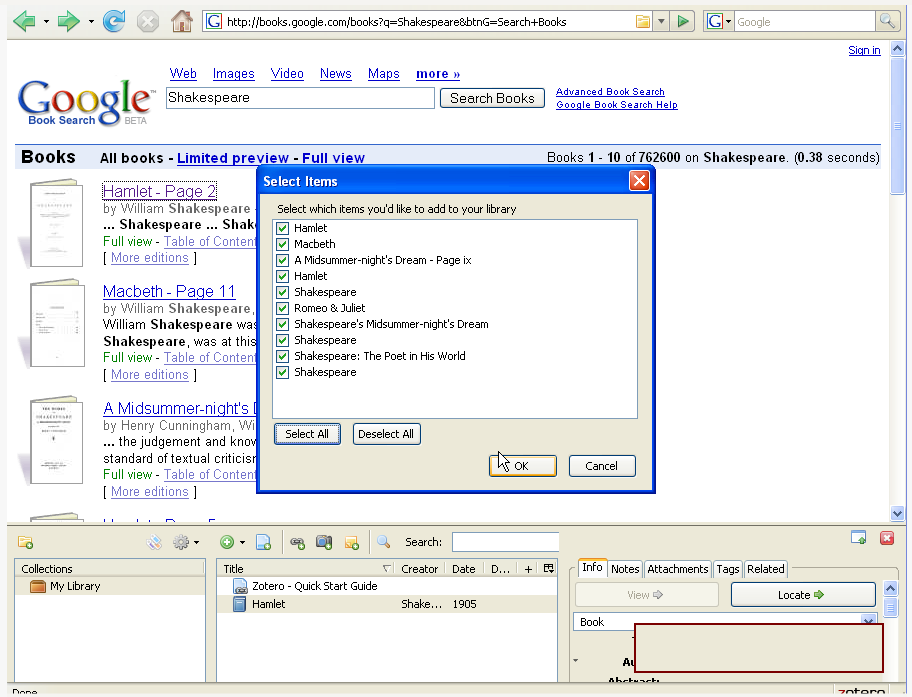
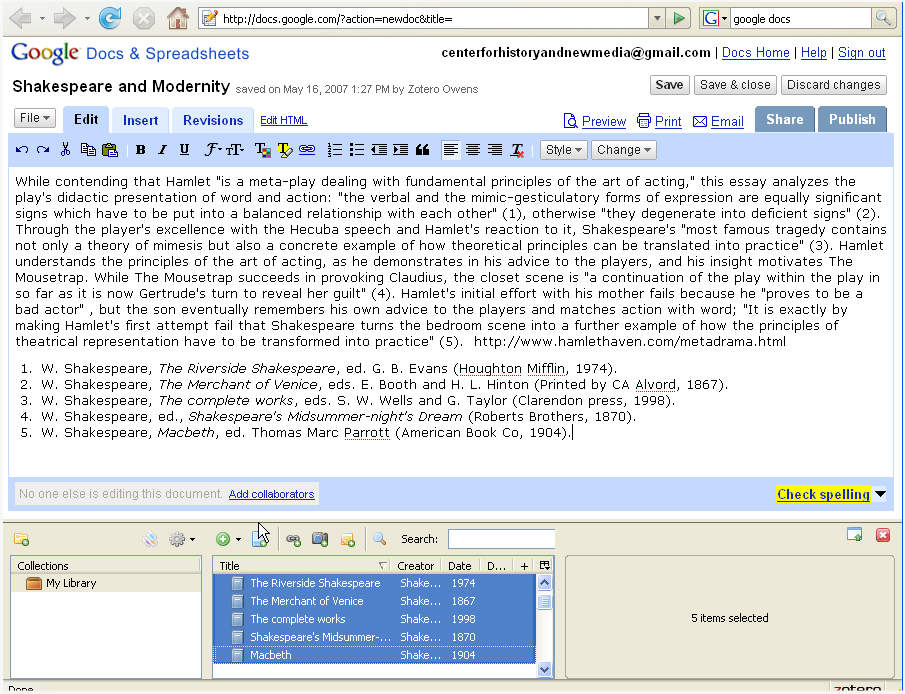
We are launching a new series of screencasts demonstrating how Zotero enhances other online tools and services. The first screencast demonstrates how Zotero can act as a citation system for Google’s suite of tools, connecting their research repositories with their web applications. Take a look and see how easy it is to automatically capture bibliographic information from sites like Google Books and Google Scholar and simply drag and drop formated references into Google Docs.
Did you know that something special happens when you export bibliographies from Zotero into HTML? Zotero automatically embeds COinS metadata in these bibliographies. This means that any HTML bibliography exported by Zotero is also Zotero-readable. In other words, if you post this HTML on the web any Zotero user will be able to surf by and capture the references into their own Zotero library.
Exporting with embedded metadata opens the door for what we like to call “smart syllabi,” where students can capture the bibliographic information for all the readings in a course with the click of a button. You can also publish “smart publications” on the web, where a reader needs just a single click to capture one or all of your your citations. With a “smart CV” anyone interested in your work can instantly capture your entire publication history.
To export an HTML bibliography all you need to do is:
1) Right-click (or control-click) on any collection, item, or items and select “Create Bibliography.”
2) Choose the bibliographic format you want to use and choose “Save as HTML.”
3) Name your bibliography and choose where to save it.
4) Now if you open that bibliography in Firefox you will notice that you can see the folder icon. You can post this bibliography to the web, and any one with Zotero will be able to capture it.
Smart bibliographies, syllabi, CVs, and publications are just a few more examples of how Zotero continues to offer easy-to-use, intuitive, unique features for those doing research–and those they wish to communicate with.