
Why is there no save button in my browser toolbar?#
The Zotero Connector places a save icon — representing the content it recognized on the page you’re viewing (book, journal article, webpage) — to the right of the address bar in your browser toolbar:
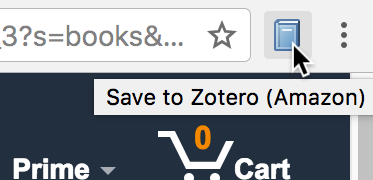
If you don’t see it, first make sure you’ve installed the Zotero Connector for your browser from the download page and that it shows up as enabled in the browser’s Extensions pane. If you’re having trouble installing it, make sure you’re running a compatible browser version.
If you still can’t find it, try the steps below for your browser.
Chrome#
When you first install a Chrome extension, it may appear initially in the Extensions popup, accessed via a puzzle-piece icon. If you find the button in that popup, click to pin it so that it stays visible.
If the extension shows as enabled in the Extensions pane but you don’t see the button anywhere in the toolbars, try uninstalling and reinstalling the extension. If it’s still not appearing, your Chrome settings may be corrupted, and you can try resetting Chrome.
Edge#
If the button doesn’t appear to the right of the address bar, it may appear in the Extensions popup, accessed via a puzzle-piece icon. If you find the button in the popup, click the “Show in Toolbar” icon to pin it so that it stays visible.
If the extension shows as enabled in the Extensions pane but you don’t see the button anywhere in the toolbars, try uninstalling and reinstalling the extension. If it’s still not appearing, your Edge settings may be corrupted, and you can try resetting them (Settings → Reset Settings).
Firefox#
If the button doesn’t appear to the right of the address bar, you can find it either in the Extensions panel (opened via a puzzle-piece button to the right of other toolbar buttons) or the overflow menu (opened via a “»” button to the right of your other toolbar buttons). If the button appears in the Extensions panel, click the gear icon and select Pin to Toolbar to keep it in the toolbar. If it appears in the overflow menu, you may need to resize your address bar to make more room for extension buttons.
If you still don’t see it, you may have a corrupted Firefox profile. Try creating a new Firefox profile and installing the Zotero Connector into that profile.
Safari#
See Safari Compatibility.