Archive for the 'News' Category

Translator roundup

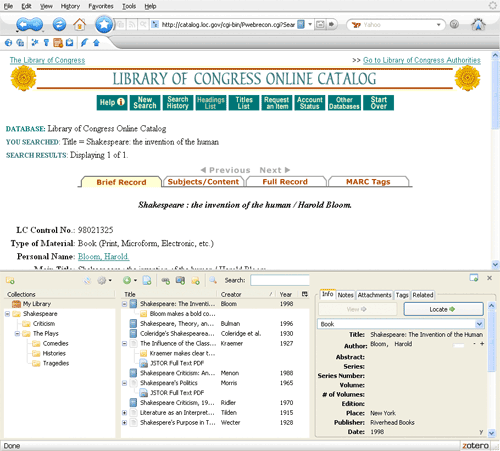
The Beta 3 release of Zotero includes many new or improved site translators for popular web-based scholarly resources, ranging from relatively small collections of individual journals, such as Nature, to large-scale database aggregators, such as Ovid. With the modified Aleph and Sirsi translators, Zotero should now be fully compatible with a host of additional university library OPACs (Online Public Access Catalogs). We’ve also updated our Ovid translator, giving users enhanced access to some of the most influential databases, full-text journals, and academic content in the sciences, arts, and humanities.

As part of our commitment to internationalization, Zotero users can now automatically capture metadata from Amazon sites around the world.

Other translator highlights:
ISI Web of Science: indexes thousands of scholarly journals in all areas of research, including the sciences, social sciences, arts, and humanities.

IEEE: indexes and in many cases provides full-text access to electrical engineering and computer science literature.

Factiva: indexes news- and business-related sources, including newspapers, newswires, magazines, and radio and television transcripts.

New translators in Beta 3:

ScienceDirect
Ovid
Blackwell Synergy
SpringerLink
Nature
IEEE Xplore translator
Factiva
Cambridge Scientific Abstracts
ACM
Web of Science (but not Web of Knowledge CrossSearch)
HighWire (Oxford Journals, Science, etc.)
AMS MathSciNet
ACS Publications

Updated translators in Beta 3

Amazon (now supports international sites and retrieves data from Amazon’s API)
Google Scholar
SIRSI
RIS
InnoPAC
JSTOR
InfoTrac
Embedded RDF

Translators added via repository since Beta 2 Release 2

arXiv.org
CrossRef
CiteBase

Translators updated via repository since Beta 2 Release 2

Google Books (site update)
Aleph
NYTimes (TimesSelect content)
PubMed (page numbers now supported)
COinS
ABC-Clio Serials Web

You can find a list of other compatible databases, library catalogs, and online resources here. Please be aware, however, that this is an incomplete inventory. Because we are constantly adding and refining translators, we encourage users to test sites for compliance rather than relying exclusively on our documentation. If there are additional site translators you would like to see, let us know on the Zotero forums.

New French and Japanese user guides

Earlier this week one of the more Francophile Zoterons here at the Center came across this fantastic French user guide. The Center for History and New Media is committed to making Zotero an international multi-lingual application and we are grateful for CIERA’s development of this French documentation. In a similar development yesterday a blogger posted a Japanese intro to Zotero on the blog PoP*PoP.

While we plan to develop user guides for a diverse set of languages we would be happy to fold in guides developed by non-anglophone users. If you would like to work on a guide for Zotero in another tongue, or have already put something together on Zotero, please contact trevor@zotero.org. We would be happy to offer any assistance we can. We are excited to connect French and Japanese users to Zotero through these guides, as each brings us one step closer to better connecting people of all languages to their research through Zotero.

Feature Spotlight: Tagging

This week we are profiling some of the new features accompanying the Zotero 1.0 Beta 3 release. Today we would like to highlight the expanded tagging functions now available in Zotero.

Tagging is an easy way to categorize items by attaching descriptive words to them. You can tag your information with whatever relevant keyword or term you would like associated with that given item. These tags allow you to sift through your information in a personal way, by the categories that deem relevant.

Located in the bottom-left-hand corner of your screen, the tag selector adds an additional layer of information management to complement the collection and search systems. The selector updates its inventory from tags you place on individual items in your Library. By clicking on any of the tags you can filter the items within your Library, collections and saved searches by as many or as few tags as you like.

You can toggle the tag selector in and out of view by clicking the tag selector box icon (). The tag selector defaults to showing all the tags on items in the current folder. When you click on a given tag, the center pane updates to display only the items with that tag. You can select multiple tags to further focus the results in the center pane or click on a tag again to deselect it. To quickly find a tag in the list, type part of its name in the Filter box; selected tags not matching what you type remain selected, allowing you to quickly find and select multiple items. It is also possible to click the “Deselect all” button to return the center pane to displaying all the items in the selected folder.

From this box you can also control the tags globally. By right-clicking on a tag (or Control-clicking on the Mac) you can choose to rename a tag across all items or delete it from all of the records it is attached to. You can also assign tags to multiple items at once by dragging items from the items pane onto tags in the tag selector. This is where the “Display all tags” checkbox comes in handy: while the tag selector normally only shows you tags on items in the current view, clicking “Display all tags” causes tags not assigned to currently visible items to appear in gray. You can then drag items onto one of the gray tags to assign it to those items.

As an example, while working on your project on the history of bottled water (see above image), you decide to tag five items “Bottled Water.” It is as easy as selecting the items and dragging them onto the Bottled Water tag in the tag selector box.

Note that some items that you save will come with tags already attached. If Zotero detects classification information or other metadata as part of a catalog record, it will, in some cases, extract that information as a tag. For example, OPAC (Online Public Access Catalog) record subject headings become Zotero tags. You can manage these automatic tags in the same way that you manage the tags you add manually.

We speak your language

The new beta release of Zotero includes native user interface support for Chinese, Dutch, French, German, Italian, Japanese, Korean, and Norwegian (and even supports Serbian, although Firefox doesn’t have a Serbian-localized build). A big tip o’ the hat to the BabelZilla community for helping to make Zotero a multilingual tool.

Interested in translating Zotero into your language? Please visit our localization documentation.

Major update to Zotero now available for public download

We’re pleased to announce that the latest beta release of Zotero is now available. Existing users who downloaded from zotero.org can update manually via Tools->Add-ons in their Firefox web browser. The update includes many new translators, features, enhancements, bug fixes, and international language localizations that we’ll be spotlighting over the next few days. For a comprehensive overview of what Beta 3 offers, see the extensive changelog.