
 Upgrade Storage
Using Zotero with Google Docs
Zotero's powerful Google Docs support helps you easily add citations and bibliographies to the documents you create in Google Docs.
You can quickly search for items in your Zotero library, add page numbers and other details, and insert citations. When you're done, a single click inserts a formatted bibliography based on the citations in your document. Zotero supports complex style requirements such as Ibid. and name disambiguation, and it keeps your citations and bibliography updated as you make changes to items in your library. If you need to switch citation styles, you can easily reformat your entire document in any of the over 10,000 citation styles that Zotero supports.
Google Docs support is provided by the Zotero Connector for Chrome, Firefox, Edge, and Safari and requires the Zotero program to function.
Using another word processor? Zotero also integrates with Word and LibreOffice.
Citation Interface
The Zotero Connector adds a Zotero menu to the Google Docs interface:

It also adds a toolbar button for one-click citing:

In the Zotero menu, you'll find the following options:
| Add/Edit Citation | Add a new citation or edit an existing citation in your document at the cursor location. |
|---|---|
| Add/Edit Bibliography | Insert a bibliography at the cursor location or edit an existing bibliography. |
| Preferences | Open the Document Preferences window, e.g. to change the citation style. |
| Refresh | Refresh all citations and the bibliography, updating any item metadata that has changed in your Zotero library. |
| Unlink Citations | Unlink Zotero citations in the document by removing the field codes. This prevents any further automatic updates of the citations and bibliographies. Note that removing field codes is irreversible and should usually only be done in a final copy of your document. |
Authentication
Interacting with the Zotero functionality for the first time in a document will prompt you to authenticate the plugin with your Google account. Be sure to select the Google account you used to create the document or that has been given editing access by the document's creator. This is unrelated to any Zotero account you may have, which isn't required to use Zotero or Google Docs integration.
Once authenticated, you can begin inserting citations from your Zotero libraries.
Citing
You can begin citing by clicking the  (“Add/Edit Zotero Citation”) button in the Google Docs toolbar or by selecting “Add/Edit Citation” from the Zotero menu, both of which will bring up the citation dialog.
The citation dialog is used to select items from your Zotero library and create a citation.

Start typing part of a title, the last names of one or more authors, and/or a year in the dialog box. Matching items will instantly appear below the dialog box.
Matching items will be shown for each library in your Zotero database (My Library and any groups you are part of). Items you have already cited in the document will be shown at the top of the list under “Cited”.
Select an item by clicking on it or by pressing Enter when it is highlighted. The item will appear in the dialog box in a shaded bubble. Press Enter again to insert the citation and close the Add Citation box.
In the Add Citation box, you can click on the bubble for a cited item and then click “Open in My Library” (or another library name) to view the item in Zotero. Items that are orphaned (i.e., not connected to any items in your Zotero database) will not have an “Open in My Library” button. Orphaned items can exist if they were inserted by a collaborator from their My Library or a group you don't have access to or if they were deleted from your Zotero library.
Bibliography
Clicking the “Add/Edit Bibliography” menu option inserts a bibliography at the cursor location.
You can edit which items appear in the bibliography by clicking the “Add/Edit Bibliography” button again, which will open the bibliography editor. See Editing the Bibliography below for more info. Manual edits made to the bibliography in the document will be overwritten the next time Zotero refreshes the document.
Collaboration
Google Docs is designed to let you collaborate on documents, and Zotero’s integration is no different. You and your coauthors can all insert and edit citations in a shared document, and you don't even need to be in a Zotero group. If you're planning a large collaborative project, though, we recommend using a group library, which not only makes it easy to collect and manage materials but will also allow all collaborators to change cited item metadata (authors, title, date of publication, etc.). If someone cites an item from their personal library, only they will be able to update the metadata for that item.
We recommend that anyone making changes to the document have the Zotero Connector installed. (The Zotero app itself is necessary only if inserting or editing citations.) If someone cuts and pastes an active citation without the Zotero Connector, the citation will be unlinked from Zotero and disappear from the bibliography, and the next person refreshing the document with the Zotero Connector will receive a warning about unlinked citations. While people without the Connector can theoretically edit non-citation parts of the document, we don't recommend it due to the risk of accidental citation unlinking.
When working collaboratively on a document, you and your coauthors should avoid inserting or editing citations at the same time. The Zotero Connector has mechanisms in place to prevent document and citation corruption from concurrent citation editing, but due to technical limitations they do not provide perfect safety.
Document Preferences
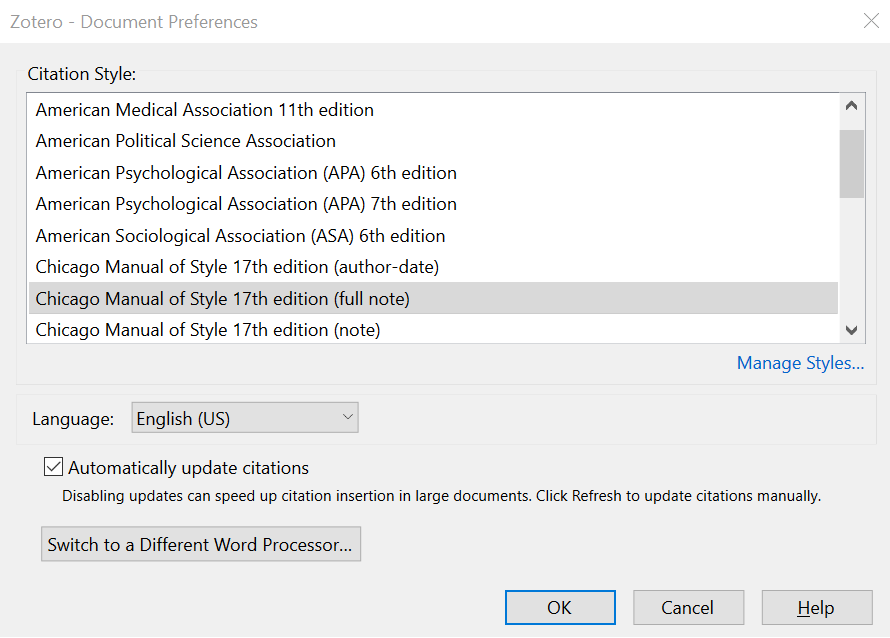
The “Document Preferences” window lets you set the following document-specific preferences:
- The citation style.
- The language to use to format citations and bibliography.
- For styles that abbreviate journal titles (e.g., “Nature”), whether to use the MEDLINE abbreviations list to abbreviate titles.
- If this option is selected (the default), the contents of the “Journal Abbr” field in Zotero will be ignored.
- Whether Zotero should automatically update citations for disambiguations, ibid and numbering, or whether updating should be delayed until a manual refresh. Note that if you enable this mode, Zotero will insert your citations with a gray background to indicate that the citation text is not final. The citation will be finalized and the gray background removed once you click “Refresh” in the Zotero menu.
Saving for Publication
When you're ready to submit your document, use File → “Make a copy…” and, in the new document, use Zotero → “Unlink Citations” to convert the citations and bibliography to plain text. You can then download that second document (e.g., as a PDF), while keeping active citations in the original document in case you need to make further changes. Zotero will prompt you to create a copy if you try to download your original document.
Customizing Cites
Citations can be customized in various ways.
If a citation is simply incorrect or missing data, start by making sure that the item metadata in Zotero is correct and complete, and then click Refresh in the plugin to update your document with any changes.
Other customizations can be made via the citation dialog. Click an existing citation in your document and click Add/Edit Citation to open the citation dialog, and then click the citation bubble to open the cite options window, where you can make the following changes.
Page and Other Locators
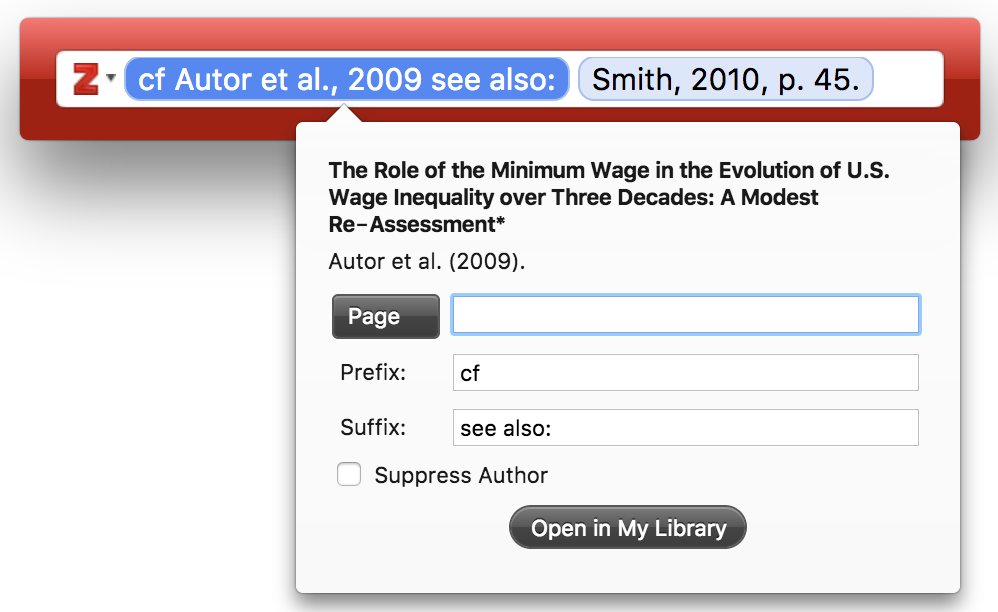
In some cases you want to cite a certain part of an item, e.g. a certain page, page range or volume. This additional cite-specific information (e.g. “pp. 4-7” in the cite “Doe et al. 2001, p. 4-7”) is called the “locator”.
The cite options windows has a drop-down list of the different locator types (“Page” is the default), and a text box in which you can enter the locator value (e.g. “4-7”). To cite a locator other than the ones listed (e.g., “Table), use the Suffix field.
You can also add page numbers from the keyboard as you insert citations. Search for an item, press Enter once to add to the citing dialog, and then, before pressing Enter again to insert it into the document, simply type “p.34” or similar, and the page number will be added to the citation.
Prefix and Suffix
The “Prefix” and “Suffix” text boxes allow you to specify text to respectively precede and follow the automatically generated cite. For example, instead of “Tribe 1999”, you might want “cf. Tribe 1999, see also…”.
Any text in the prefix and suffix fields can be formatted with the HTML tags <i> (for italics), <b> (bold), <sub> (subscript), and <sup> (superscript). For example, typing ”<i>cf</i>. the classic example“ will be displayed as ”cf. the classic example“.
Prefixes and suffixes can be applied to each item in a citation to create complex citations. For example: ”(see Smith 1776 for the classic example; Marx 1867 presents and alternate view)“. Modifying citations by entering text into the Prefix and Suffix fields is always preferable to directly typing in the citation fields in the document. Manual modifications will prevent Zotero from automatically updating the citation.
Omitting Authors: Using Authors in the Text
With author-date styles, authors are often moved into the text and omitted from the following parentheses-enclosed citation, e.g.: ”…according to Smith (1776) the division of labor is crucial…“. To omit the authors from the cite, check the “Omit Author” box (this will result in a cite like ”(1776)“ instead of ”(Smith, 1776)“) and write the author's name (“Smith”) as part of the regular text in your document.
Citations with Multiple Cited Items

To create a citation containing multiple cites (e.g., ”[2,4-6]“ for numeric styles or ”(Smith 1776, Schumpeter 1962)“ for author-date styles), add them one after the other in the Add Citation box. After selecting the first item, don't press Enter/Return, but type the author, title, or year of the next item.
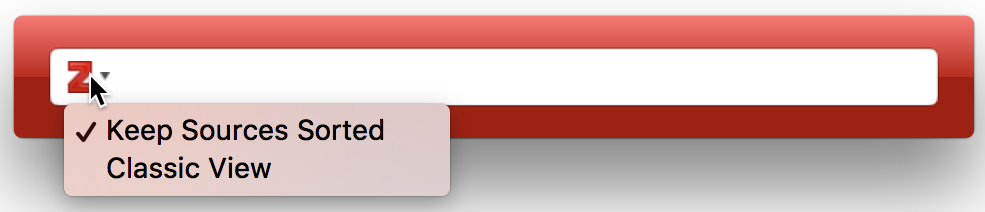
Some citation styles require that items within one in-text citations are ordered either alphabetically (e.g., ”(Doe 2000, Grey 1994, Smith 2008)“) or chronologically (”(Grey 1994, Doe 2000, Smith 2008)“). Zotero will follow these sort rules automatically.
- To disable automatic sorting of the cites in the citation, drag the citations to rearrange them in the Add Citation box. You can also click the “Z” icon on the left side of the Add Citation box and uncheck the “Keep Sources Sorted” option. This option only appears for citation styles that specify a sort order for citations. To restore automatic sorting, re-check the “Keep Sources Sorted” option.
Switching to the "Classic View"
You can switch to the "Classic View" citation dialog by clicking the “Z” icon on the left side of the Citation box, and selecting “Classic View”. To permanently switch to the classic view check the “Use classic Add Citation view” checkbox in the Cite pane of Zotero preferences.
Editing the Bibliography
After you've inserted the bibliography using the “Add/Edit Bibliography” option, select it again to open the Edit Bibliography window.

In this window, you can add uncited sources to your bibliography (e.g., items included in a review but not cited in the paper) or remove items that are cited in text but which should not be included in the bibliography (e.g., personal communications).
While it is also possible to edit the text or formatting of bibliography references in this window, doing so is discouraged. References edited here will not be automatically updated by Zotero if you change the data in your library.
If you need to edit items in your bibliography, it is best to do this as a final step before submitting the document. First, make a copy of the document. Then, in the copy, use the “Unlink Citations” menu option to disconnect your document from Zotero and convert all citations and the bibliography to regular text. Finally, make your adjustments to the bibliography text.
This process can be used for a variety of minor modifications to the bibliography, including:
- Adding asterisks before references included in a review or meta-analysis
- Setting the names of particular authors in bold, italics, or all caps
- Adding annotations or comments about an item
- Adding headings for bibliography subsections (e.g., primary versus secondary sources)
Note: General corrections to style formatting should be made in the CSL citation style, not in this window. Corrections to item data should be made in your Zotero library.
Keyboard Shortcuts
You can use keyboard shortcuts for improved accessibility and faster citing.
- Press Ctrl-Command-C (Mac) or Ctrl-Alt-C (Windows/Linux) to insert a citation. You can configure this from the Advanced pane of the Zotero Connector preferences.
- In the citation dialog
- Use the up and down arrow keys to move between search results. Press Enter to select an item.
- Type “p.45-48” or ”:45-48“ after a citation to cite a specific page or page range.
- Type “ibid” to automatically select the last cited work. This works with all citation styles, regardless of whether “ibid” is actually used in citations. If you use Zotero in a language other than English, use the corresponding abbreviation instead of ibid., e.g. “ebd.” in German.
- Press Ctrl/Cmd-↓ (down arrow key) to open the cite options dialog for the citation under the cursor. Use Tab and Shift-Tab to move between the different elements, use the up and down arrow keys to change the locator type in the locator drop-down list, and the space bar to toggle the “Suppress Author” checkbox.
Limitations
While we've tried to create the same experience available in Word and LibreOffice, there are some limitations to be aware of when working in Google Docs:
- As noted above, anyone making changes to the document should have the Zotero Connector installed. (The Zotero app itself is necessary only if inserting or updating citations.) Citations that are cut and pasted without the Connector installed will be unlinked.
- Dragging citations within the document will cause the citations to become unlinked. Cutting and pasting is fine as long as the Zotero Connector is installed.
- If someone views the document without having the Zotero Connector installed, or if you download the document instead of first making a copy and unlinking citations, active citations in the document will show up as links leading to URLs such as https://www.zotero.org/google-docs/?abc123.
- Citation inserts and edits slow down significantly as the number of citations increases. With 100+ citations, a single citation update can take up to 10 seconds, so for longer documents you'll want to disable automatic citation updates in the Zotero document preferences.
- Google Docs provides limited facilities for text formatting. Styles that use small caps fonts will not use a true small caps formatting style in Google Docs and will instead fall back to the “Alegreya Sans SC” font. Citations that have been inserted with automatic citation updates disabled will be inserted with a gray background instead of dashed underlining like in Word and LibreOffice.
Troubleshooting
Menu doesn't appear
If nothing appears when you click the Zotero menu, or you see a thin gray line, try restarting Zotero and your browser.
If that doesn't help, disable all other browser extensions, reload Google Docs, and try again. In particular, the Google Docs Offline extension has been reported as interfering with Zotero's Google Docs integration.
In some browsers, you may need to give the Zotero Connector permission to run. While Google Docs support only requires access to docs.google.com and www.zotero.org, if you're going to be using Zotero, you'll want to use the Zotero Connector to save to Zotero, and for that to work it needs to be able to run on all sites. (See why this is safe.) In Chrome or Edge, right-click on the Save to Zotero button in your browser toolbar, select “This Can Read and Change Site Data”, and choose “On All Sites”. In Safari, go to the Websites tab of the Safari settings, click on Zotero Connector in the left column, and make sure any sites that show up and “For other websites” at the bottom are all set to “Allow”.
If it's still not working, try in a new browser profile (e.g., a new Chrome profile) or in a different browser.
Citation dialog doesn't appear after clicking Add/Edit Citation
If you can open the Zotero menu but the citation dialog doesn't appear after you click Add/Edit Citation, make sure that a dialog isn't appearing behind your other browser or Zotero windows.
Unlinked Citations
“The Google account you selected does not have permission to edit this document”
You likely selected the wrong Google account. See Authentication.
Other problems
If you encounter other problems citing in Google Docs, let us know in the Zotero Forums. Provide a Debug ID from the Zotero Connector for reloading Google Docs and trying to perform the relevant action.
You should always troubleshoot in a new, empty document or with a copy of the original document, using File → “Make a copy…”. If something isn't working in a particular document, the document version history may allow you to revert to an earlier version. Some of the Debugging Broken Documents steps may also be useful in Google Docs.